


Destiny 2‘s Monument of Triumph update is the game’s last content patch. Eager gamers can preload it if they want to get ahead in the action—but make sure no one in your house is streaming anything, because you might need a lot of bandwidth for it.
Monument of Triumph is one of Destiny 2‘s most successful patches, which would be amazing if it weren’t tragic. It’s the game’s swan song, the final content update before development on it ends. The future doesn’t look good, either, so fans are planning to bombard the servers with logins in hopes of a sequel.
Here’s how to preload Destiny 2‘s Monument of Triumph update, whether you’d like to be the first through the door or you’re waiting until go time.
When can you preload Destiny 2’s Monument of Triumph update
Preload for Monument of Triumph starts at 11am CT on June 9, one hour before Destiny 2‘s last content patch is scheduled to drop. The download itself is relatively small, though the preload can be colossal depending on your platform. Steam, for instance, seems to require you to have both the old and new versions of a game when preloading, which does not bode well for bigger games.
Destiny 2 Monument of Triumph update preload size
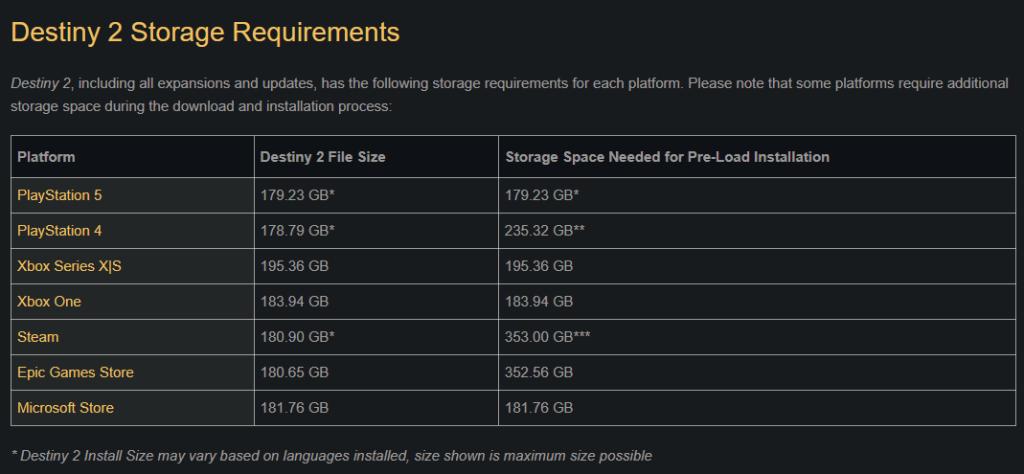
The update size for Monument of Triumph ranges from roughly 27 to 37GB, but you may need a lot of hard drive space for the game.
In previous preloads, you needed to download the entire game. Luckily, Bungie changed the formula for Monument of Triumph. This time around, you only need to get the new content. On Steam, this only amounts to a 24GB download, unlike the 180GB we thought it’d take for the full game.
Steam users, we’re down on our luck: we need 353GB of hard drive space if we want to preload, according to Bungie, since the platform seems to require both the old and new versions of Destiny 2 at the same time. This will shrink down to “just” 180GB after the update goes live. The same principle goes for Epic Games. If you don’t want to preload, though, you can grab the smaller download when Monument of Triumph goes live.
On the flip side, Guardians on consoles and the Microsoft Store only need roughly 180-190GB of hard drive space. The exception is PlayStation 4, which requires up to 235.32GB.
How to preload Destiny 2’s Monument of Triumph update
If you play on console (or are okay with a long download), you can start your preload once 11am CT hits, barring any delays.
On Steam, the preload should appear automatically. Make sure Destiny 2 is set either to update by itself or as high-priority for the download to show up. If you still don’t see it, restarting Steam has worked for us in the past.
For consoles, you can either set Destiny 2 to update automatically or download the Monument of Triumph patch/preload manually by checking for an update. For Xbox Series X | S, look for this toggle on Settings, then Systems, then Updates. PlayStation 5 users have a handy Check for Updates button on the game’s Settings tab (on the console, not within the game itself). Users on older consoles, Epic Games, and Microsoft Store should check out Bungie’s Destiny Update Guide.


