


Many Aniimo can only be encountered at certain times of day or under specific weather conditions in Aniimo, so you may be struggling to find them without altering these key features. The main storyline teaches you how to change time, but not weather.
This is an important gameplay mechanic to master if you’re on the hunt for a specific Aniimo, and especially useful if you’re looking for creatures you may not have encountered yet, as weather changes are generally a bit rare. If you’re struggling to make it happen, here’s how to change the weather in Aniimo.
Table of contents
Can you change the weather in Aniimo?

Yes, you can change the weather in Aniimo. It’s not a feature that’s available to you right away, but it does unlock fairly early on in the main storyline. And depending on what you want to use it for, there are a few different ways you can alter the weather.
All ways to change the weather in Aniimo
As of the time of writing, there are four ways to change the weather in Aniimo. Here’s a breakdown of how to apply each one and what the differences between them are.
- One way you can change the weather is by interacting with the Breezy Plains Branch. To use this feature, you first need to spend a total of 60 Lumin Ambers. Once you’ve done so, you can select the Change Weather option in the bottom-left corner, choose the biome you want to change, select your desired weather, and spend a Prismana Crystal to apply the effects.
- To actually activate any of the weather options using this feature, you need to have the Silver Collection Badge for your desired region unlocked. This means you must reach 70 percent collection progress and defeat the local Alpha in the area before you can switch up the weather.

- Another way you can change the weather is by visiting another player’s world. This method isn’t guaranteed, but upon traveling to another player’s world, you may find different weather conditions there.
- If you only want to change the weather for photos, you can use photo mode to change the weather. This effect doesn’t actually change the weather, but instead activates the effects temporarily in this mode so you can snap some photos. The weather tab is the sixth one over and has a cloud icon on it.
- If all else fails, the fourth and final way to change the weather is simply waiting for it to change naturally. The weather changes randomly, but if you’re curious about when you might expect to see some changes, you can check the weather schedule to learn when your desired weather is coming.
How to check the weather schedule in Aniimo
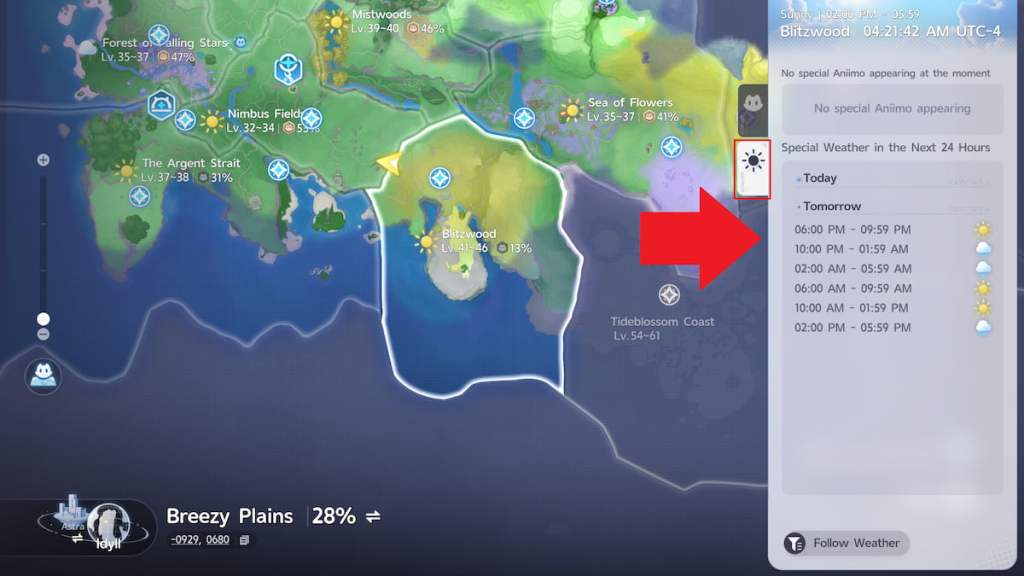
You can check the upcoming weather schedule by zooming all the way out on the map, hovering over the region you want to check, clicking on the biome, and selecting the tab with a sun on it. To see the upcoming weather for each area, you’ll need to repeat this process for each region. Make sure you’re all the way zoomed out on the map for the weather tab to appear, as it only pops up when you are.
There’s plenty more to discover in Aniimo. If you aren’t sure what to do next, consider learning how to change your hair color, how to get Aniipod Ultras, how to decide which Prismana Pact Aniimo to pick, and how to become a Junior Wayfarer.


