


Aniimo’s got a pretty detailed character creator, and even after you’re done customizing your avatar the first time around, you can return to it again and again to fine-tune details as desired. One feature you may be hoping to change up regularly is your hair color.
Although many features come with some guidance and explanations to help you get familiar with them, this one doesn’t, and it’s also quite hidden. It can be pretty tricky to figure out at first because of this, so here’s how to change your hair color in Aniimo.
How do you change your hair color in Aniimo?
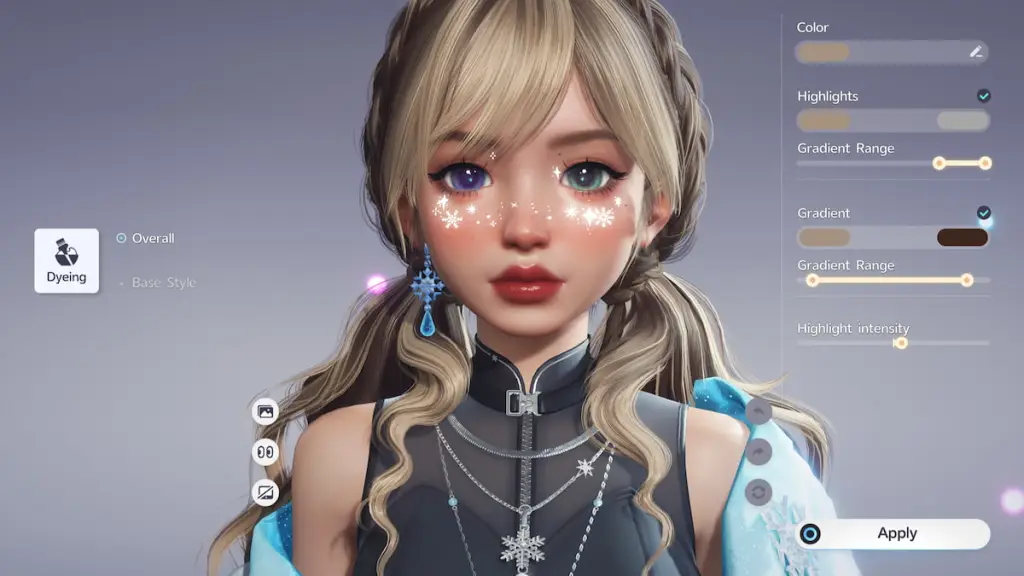
You can change your hair color on the Appearance page by spending one Hair Saloon Card to do so in Aniimo. Here’s a full step-by-step breakdown of how to make it happen.
- Open the Appearance page. You can find it on the main menu hub, right between the Character and Party tabs. If you don’t have it available in your menu, you need to keep progressing through the main storyline until it pops up. This option becomes available as soon as you visit the front desk at the institute for the first time, so it’s fairly early on.
- Switch to the Hairstyle tab. Once the Appearance menu is open, find and switch over to the Hairstyle tab on it. You can switch between the Appearance tabs in the bottom left corner, and the Hairstyle option is the third one over to the right.
- Find and select the hair you want to change. On the Hairstyle page, all of the hairstyles you’ve unlocked are displayed. Locate and click on the one you want to change the color of.
- Open the Design Studio. With the hairstyle you want to change selected, click on the Design Studio button in the bottom right corner.
- Change your hair color. Use the color wheel, highlight, and gradient options to adjust your hair color to the desired look.
- Spend one Hair Saloon Card to apply the new look. Once you’re happy with the new color, spend one Hair Saloon Card to officially apply it. As soon as you do, the new color is permanently unlocked for your chosen hairstyle, which means you can freely switch between this color and any others you also have unlocked.
The hair coloring process is tied to each individual hair separately. This means you must redo the coloring and spend a Hair Saloon Card to change up the look of each hair you want to recolor.
How to get Hair Saloon Cards in Aniimo
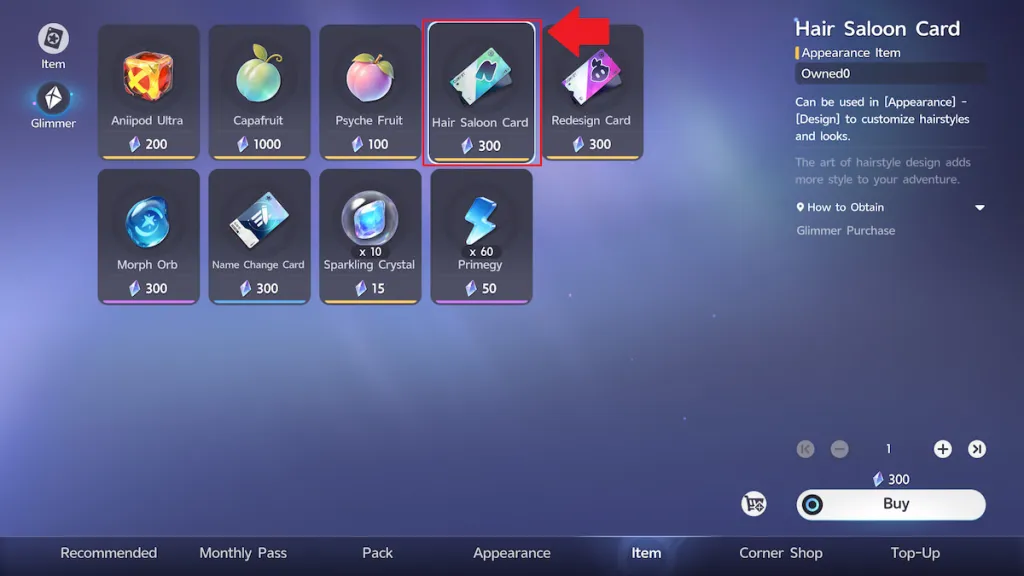
To change your hair color, you need a Hair Saloon Card. You can purchase them from the shop. Hair Saloon Cards are available to buy for 300 Glimmer on the Item page in the shop.
You’ll earn Glimmer naturally over time while playing, so luckily, this item is not restricted to paid players only. It is a slightly rarer currency, though, so make sure you spend your Glimmer wisely.
There are plenty of other tricky aspects you may get stuck on while playing Aniimo. Some other features you may need help navigating are deciding which Prismana Pact Aniimo to pick, obtaining Collection Badges, getting Aniipod Ultras, and becoming a Junior Wayfarer.


