


Storage in World of Warcraft: Forever is a staple mechanic. The inventory and the bank, if you no longer have space, are almost an MMO standard at this point. You collect loot; you store it in the inventory; the rest at the bank. End of story, right? Well, this is where the “almost” part of that intro sentence comes into effect.
See, WoW is unique for introducing storage bags that go into your inventory and give you even more storage space. And now Forever, being a redo of the OG release, has introduced new mechanics designed to make your leveling (and most importantly, looting and farming) more enjoyable. But where exactly do we begin?
A recap on storage in WoW Forever
Before we throw things away that, err, “doesn’t spark joy,” let’s recap what we understand so far about storage in WoW Forever. This foundation will help you zero in on whatever organizational system you might feel is useful for your character or account as a whole. Here’s the important stuff to remember:
- Backpack: This is your inventory, where all your items on your person are located. There’s room for four (4) bag slots, all of which can be expanded to give more space depending on how large those bags are.
- Bank: Capital cities have a bank you can go to, which in itself has its own extra inventory space. Anything you want to store for the character that you don’t immediately need goes here.
- Mail: This is where your usual Blizzard announcements and gifted goodies arrive, but there’s another use case here that we’ll explore later on.
- Guild storage: There’s also a dedicated storage for Guilds, but this is something you can only access when allowed by your Guild leaders.
Expand your Backpack with more storage Bags
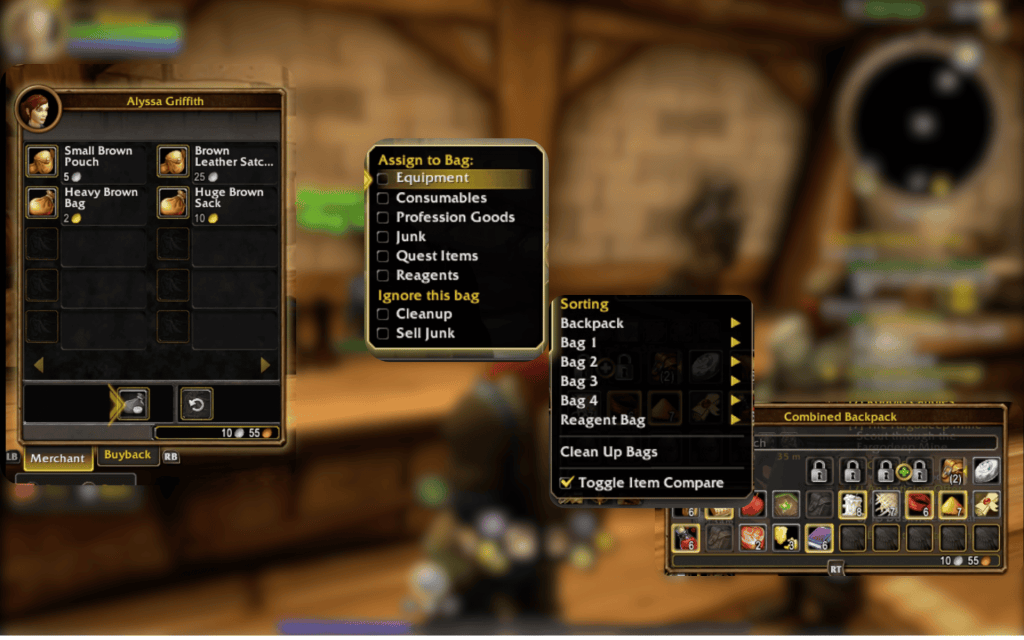
Your Backpack has 16-20 main slots and four separate dedicated Bag Slots to expand your storage. There are a lot of ways to get Bags to put into these extra slots, such as Crafting. But if you’re more interested in buying or looting extra Bags, here’s what you could get:
| Bag | Slots | How to get |
|---|---|---|
| Small Brown Pouch | 6 (5s) | General Goods vendor |
| Brown Leather Satchel | 8 (25s) | General Goods vendor |
| Heavy Brown Bag | 10 (2g) | General Goods or Bag Vendor |
| Huge Brown Sack | 12 (10g) | Bag Vendors such as Alyssa Griffith in Stormwind and Gotri in Orgrimmar |
| Sturdy Lunchbox | 12 | Drops from Venture Co. Foreman (Stranglethorn Vale), or reward of Stepping Stones (Quest) |
| Large Knapsack | 12 | Drops from mobs level 30-49 |
| Troll-hide Bag | 14 | Drops from mobs level 39-53 |
| Journeyman’s Backpack | 14 | Drops from mobs level 39-60 |
| Darkmoon Storage Box | 14 (50 tickets) | Darkmoon Faire shop |
| Traveler’s Backpack | 16 | Drops from mobs level 47-60 |
| Wayfarer’s Knapsack | 16 | Drops from Ribbly Screwspigot (Blackrock Depths) |
| Barkskin Satchel | 18 | Dala Fairmaw, Mount Hyjal, Honored with Barkskin Burrow |
| Onyxia Hide Backpack | 18 (Raid drop) | Drops from Onyxia (based on Classic, since she arrives in Forever this Dec. 2026) |
Organizing your Backpack
One of the newest features to come to Forever is the option to sort your Backpack and the Bags you equipped. You can assign specific item types to be sorted into them, or even dedicate them for items you want to sell or throw away. Here are the sorting options at a glance:
- Assign to Bag: This command lets you dedicate a specific item type to this storage, such as Consumables, Equipment, Junk, Profession Goods, Quest Items, and Reagents.
- Ignore this bag: Use Cleanup to re-sort items, and Sell Junk so your junk is sold when you go to a vendor.
- Convert to separate bags: If you don’t like the unified Backpack look, you can switch up the view to see your Backpack and Bags separately instead. This is perfect if you like simulating that you’re an adventurer carrying a lot of pouches.
- Dedicated “Sell all Junk” button: Vendors also have a dedicated “Sell all Junk” button that you can click so all junk items (they have a small coin label) are auto-sold.
Reagents get the 5th Backpack Bag Slot
There’s technically a fifth Bag Slot in your Backpack, and it’s reserved for Reagents. This is a neat (in this case, both awesome and tidy) addition, as you no longer have to assign some random Bag to store your crafting materials like Cloth, Herbs, and Ore. Some Professions also let you craft dedicated Reagent Bags:
| Reagent bag | Slots | How to get it |
|---|---|---|
| Light Leather Reagent Bag | 6 | Leatherworking |
| Linen Reagent Bag | 6 | Tailoring |
| Shipwright’s Satchel | 6 | Quest reward (binds) |
| Woolen Reagent Bag | 8 | Tailoring |
| Silk Reagent Bag | 10 | Tailoring |
| Spidersilk Sack | 10 | Quest reward (Horde, binds) |
| Mageweave Reagent Bag | 12 | Tailoring |
| Runecloth Reagent Bag | 14 | Tailoring |
| Mooncloth Reagent Bag | 18 | Tailoring |
| Bottomless Reagent Bag* | 20 | Tailoring |
You can have two or more Bags for Reagents, but only one can be the Reagent Bag. This is helpful if you have two Gathering Professions and want to dedicate one Bag for each Profession. Just be careful that you don’t accidentally equip one of them as the “official” Reagent Bag, so you have to put items into the other Reagent Bag.
Warlocks can put the Soul Bag into this Reagent Slot as well.
*Bottomless Reagent Bag only has 20 slots, so it’s not exactly bottomless.
Collections store Mounts, Pets, and Toys
Your adventures in Azeroth will likely give you more than just gear to equip, consumables to use, junk to sell, and quest items to turn in. There’s evidently going to be the occasional doodad and knick-knack from the people you help, and even the coveted Level 40 Mount. Unlike in previous WoW editions where they consumed a dedicated space in your Backpack, they’re now put inside a dedicated Collections window. Toys and new Transmog looks go in here as well.
Banks are now twice as large
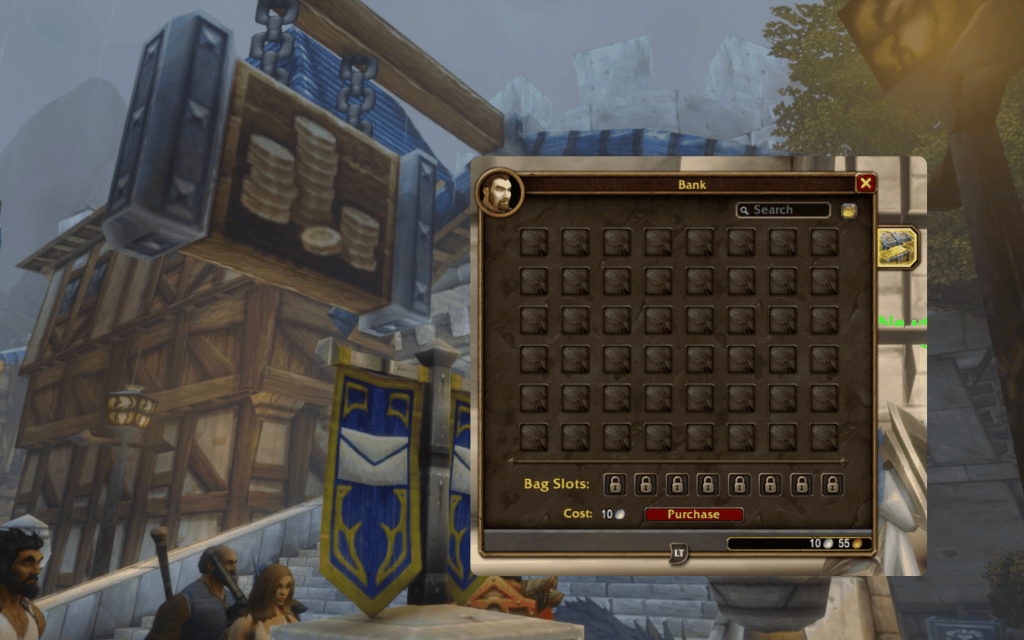
If you feel like you’re not getting enough inventory space, you can rely on your Bank to store your extra ammo, Gathering materials, and even higher-level gear you want to be using for later. You can go to any capital city to check out your Bank, which has the following properties:
- Default 48 slots: Your Bank has 48 default slots, which is double the OG’s starting number of 24.
- 8 Bag slots available: You can purchase 8 Bag Slots within your Bank, which is more than the OG’s starting number of 6.
- Costs scale per new slot: Buying new Bag Slots in the Bank will have a scaling cost of 10s, 1g, 10g, 25g, 50g, and finally 10g for the final slot.
- Quest Items need to be in your Backpack: You can store Quest Items in the Bank, but they have to be in your Backpack if you want to turn them in.
Interchange Backpack Bags and Bank Bags
Just getting it out there, the purchasable Bag Slots in the Bank work exactly like Bag Slots in your Backpack. You can grab an existing Bag and put it in your Bank’s Bag Slot for extra storage. It doesn’t have to be empty, either. You can exchange entire Bags (and the items inside) so you can instantly access your setups.
Use the Mail to send stuff to your other toons
The Mail isn’t just there for Blizzard announcements and messages from NPCs when you start unlocking special dialogue or events through quests. One useful feature people often forget about the Mail is the fact that you can also use it to send stuff to other people. If you want to send something to another character, just send it through the Mail. Just keep in mind the following restrictions:
- 30-day expiration date: Hopefully it won’t take this long for you to get your items for your other character, but it helps to know your mail (and items) will get deleted if you don’t get them in time.
- 12 items per message: You can attach up to 12 items (technically stacks) per in-game mail.
- Fee varies: Usually you just need 30c extra to send one item, so if you send 12 items in one in-game mail that’s going to cost around 3s 60s.
- No restricted items: Anything that is soulbound or is attached to your character cannot be mailed to others.
- Same faction only: If you’re planning on sending to alts, make sure they’re in the same faction. In-game mail (so far) only works within the same faction, so you need to arrange some Auction House action to have a third-party get your items for your alt.
Make sure you go and check out our sister site, GTA 6 Bible, for all your GTA 6 needs!
Get free Bags from quests
There are a lot of ways you can get free Bags throughout your Forever journey, especially if you’ve just started your adventure. For starters, your character’s starting zone will give you a quest that rewards you with a free 6-slot Bag, so watch out for these:
| Race | Zone | Bag |
|---|---|---|
| Human | Elwynn Forest | Book Bag |
| Tauren | Mulgore | Scorched Leather Pouch |
| Dwarf and Gnome | Dun Morogh | Canvas Latchbag |
| Undead | Tirisfal Glades | Collecting Basket |
| Orc and Troll | Durotar | Handmade Leather Bag |
| Night Elf | Teldrassil | Soft Saber Sack |
| Skyborne | Zephras Isle | Simple Leather Satchel |
Once you venture into the world at large, you can go to zones with quests that reward you with new Bags. So, on the off chance you want more Bags before you venture into dungeons or farm for materials, consider these quests:
| Level | Quest | Zone | Faction | Bag |
|---|---|---|---|---|
| 7 | Buzzbox 525 | Darkshore | Alliance | Wizbang’s Gunnysack (8) |
| 9 | Poor Old Blanchy | Westfall | Alliance | Old Blanchy’s Feed Pouch (8) |
| 9 | Parts and Pieces | The Barrens | Both | Scuffed Shipping Crate (8) |
| 10 | Captain Sander’s Hidden Treasure | Westfall | Both | Captain Sander’s Booty Bag (8) |
| 13 | Deviate Hides | Wailing Caverns (Dungeon quest) | Both | Deviate Hide Pack (10) |
| 13 | Miner’s Fortune | The Barrens | Both | Old Moneybag (6) |
| 14 | Stepping Stones | The Barrens (Quest chain) | Both | Old Toolbox or Sturdy Lunchbox (12) |
| 15 | Vyrin’s Revenge | Loch Modan | Alliance | Hunting Satchel (10) |
| 18 | The Night Watch | Duskwood | Alliance | Gunnysack of the Night Watch (10) |
| 19 | Digging Through the Ooze | Wetlands | Alliance | Ooze-covered Bag (10) |
| 20 | Blueleaf Tubers | Razorfen Kraul (Dungeon quest) | Both | Jewelry Box (6) |
| 23 | Stronger than Steel | Mulgore (Skywatcher Plateau) | Horde | Spidersilk Pouch (12) or Spidersilk Sack (Reagent Bag) |
Craft Bags with your Profession
Depending on your tradeskills of choice, your Gathering Professions can go to a specific Reagent Bag, while certain Crafting Professions can craft a particular type of Bag:
| Profession | Default bags you can get when you start | Can it craft bags | What is stored in the Reagent Bag |
|---|---|---|---|
| Tailoring | – | Yes, most bags in the game | Cloth, bolts, thread and dyes |
| Leatherworking | – | Yes, but only specific Bags, Reagent Bags, Quivers, and Ammo Pouches | Leather, hides, salt, thread and dyes |
| Skinning | Apprentice’s Skinning Satchel (4) | No | Leather, hides and scales |
| Herbalism | Apprentice’s Herb Pouch (4), Herb Pouch (12) | No (Tailors make their Bags) | Herbs |
| Alchemy | – | No | Herbs and vials |
| Mining | Apprentice’s Mining Pack (4) | No | Ore, stone and bars |
| Blacksmithing | – | No | Bars, stone, flux and grinding stones |
| Engineering | – | No | Bars, stone, blasting powder and parts |
| Enchanting | – | No (Tailors make their Bags) | Dusts, essences and shards |
| Cooking | – | No | Meat, fish and spices |
| First Aid | – | No | Cloth for bandages |
Tailoring
Tailoring is the only Profession in Forever that can create storage bags for a wide variety of uses, on top of Clothing gear for spellcasters. Aside from making dedicated Reagent Bags and storage for Enchanting materials and Herbs, they’re also the only Profession capable of creating storage for Soul Shards, an important resource for Warlocks. Consider the following:
| Bag | Slots |
|---|---|
| Linen Bag | 6 |
| Red Linen Bag | 8 |
| Woolen Bag | 8 |
| Green Woolen Bag, Red Woolen Bag | 10 |
| Small Silk Pack | 10 |
| Green Silk Pack, Black Silk Pack | 12 |
| Mageweave Bag | 12 |
| Red Mageweave Bag | 14 |
| Runecloth Bag | 14 |
| Mooncloth Bag | 18 |
| Bottomless Bag | 20 |
| Enchanted Mageweave Pouch | 16 (Enchanting materials) |
| Enchanted Runecloth Bag | 20 (Enchanting materials) |
| Big Bag of Enchantment | 24 (Enchanting materials) |
| Cenarion Herb Bag | 20 (Herbs) |
| Satchel of Cenarius | 24 (Herbs) |
| Soul Pouch | 20 (Soul Shards) |
| Felcloth Bag | 24 (Soul Shards) |
| Core Felcloth Bag | 28 (Soul Shards) |
Leatherworking
Meanwhile, there are indeed Bags you can create when you pursue Leatherworking, but they’re not as in-depth as the ones you make for Tailoring. If you’re a Hunter and need a place to store your Arrows and Bullets while you level with your companion, Leatherworking is the place to get craftable Ammo Pouches and Quivers. Consider the following:
| Bag | Slots |
|---|---|
| Kodo Hide Bag | 6 |
| Light Leather Reagent Bag | 6 (Reagents) |
| Light Leather Quiver | 8 (Arrows) |
| Small Leather Ammo Pouch | 8 (Bullets) |
| Heavy Leather Ammo Pouch | 14 (Bullets) |
| Thick Leather Ammo Pouch | 16 (Bullets) |
| Quickdraw Quiver | 16 (Arrows) |
Get Bags for your Classes
Aside from Professions, you can also get some Bags as quest rewards or even buy them from vendors. This is useful for Classes who have specific consumables for Soul Shards (Warlock), as well as ammunition via Quivers and Ammo Pouches. Consider the following:
- Warlock: “The Binding” quest can give you a Small Soul Pouch (12-slot) and Box of Souls (16-slot)
- Hunter: The Class starts with a free Small Ammo Pouch (6-slot)
- Hunter: You can get a Light Quiver (6-slot, 4c), Small Quiver (8-slot, 1s), a Medium Quiver (10-slot, 10s), or a Small Shot Pouch (8-slot, 1s) from a weapon vendor
- Hunter: You can also get the Harpy Hide Quiver (16-slot) and Gnoll Skin Bandolier (16-slot) from the Alterac Valley supply officer
Steamwheedle Lost and Found to the rescue for forgotten dungeon loot
Dungeon loot is probably one of your main concerns as to why you want to optimize your inventory, and that’s a perfectly valid excuse to get your Backpack sorted out with only your essentials before you go on your way. But on the off-chance that your inventory just got filled to the brim with goodies and you have no room for more, you can technically still leave the dungeon or instance and still get your items.
This is done through Steamwheedle Lost and Found, which is more or less a dungeoneering mail service. It’s managed by Rix Xizzix, originally in Classic’s Season of Discovery, who made their way to Forever as well. Any uncollected loot (Uncommon, Rare, or Epic) from a dungeon will be sent via in-game mail.
Of course, still make it a habit to have inventory space when you’re doing dungeons.
Get free Backpack slots
If you’ve noticed, your Backpack technically has 20 slots, but only 16 are accessible. That’s because the four (4) leftover locked slots are actually only unlockable when your Battle.net account is linked to an authenticator and has phone notifications. Thankfully, this is easy to do:
- Download the Battle.net app on your phone and go to your account’s “Security” page
- Turn on the authenticator and follow the steps there
- Go to “Phone Notifications” and add a phone number that can receive texts, per the SMS Protect feature that Blizzard uses to secure accounts
- This is an account-wide bonus, so all your characters get the new 20-slot Backpack by default
- Only postpaid numbers allowed
Create your own toon banks
One popular storage strategy that WoW players do even in the OG days would be creating characters specifically for item storage. Since Bags don’t have a level requirement, your main can technically just mail whatever you want stored into your alt with no issues at all. You can even invest and have your alt purchase all the available bank slots and store all your storage there. If you’re planning to run a whole enterprise revolving around your Profession (especially if you’re into those hyper-optimized factory-style setups), then this might be for you.
Guild bank for your community
Once you become a part of a Guild, you’ll also unlock what’s called a Guild bank. This is basically everyone’s storage where you can store community-accessed items such as consumables, crafting materials, money, and things that everyone’s allowed to take from and contribute to.
It also has its own set of tabs that the Guild can purchase to get more storage. But since it’s a community-wide storage, it’s evidently going to be expensive. Keep in mind that your Guild leaders (and any relevant admin) can set permissions for who can do what with the Guild bank, so ask politely if you want to contribute or get something from it. Guilds that actively raid together usually have the Guild bank reserved for any helpful items.


