


Updated October 17, 2026
We added new codes!
You can really tell there’s a lot of passion put into the development of Stand Out just by the amount of both popular and niche JoJo’s Bizarre Adventure stands in the game. Each one has a unique style and mechanics and you know the devs are Roblox RPGs nerds like me just by the fact that Emperor has a damn Cero Metralleta move from Bleach games. Dive into the Stand Out codes below and test out each Stand to find your favorite.
All Stand Out codes list
Besides in-game rewards like finding cases and getting badge rewards via the Gift app, there’s also Stand Out codes to claim. These will offer various rewards to speed up progression and give you an easier time to try out new Stands. For similar JoJo games, check out our A Universal Time codes list.
Active Stand Out codes
- PLAYTEST—Redeem for 10 Mysterious Arrows (New) (Only works during the playtest)

8,000+ Roblox players already have our codes list
Codes Hunter puts our live codes database in your browser. Install today and never miss a Roblox code again.
This is what Codes Hunter shows you.
Codes Hunter does the codes hunting for you.

Stay up-to-date on ALL the latest Roblox news and releases
Join Problox, our free newsletter — the biggest new games, updates, events and codes, in one email.
You’re in — welcome to Problox
Your first issue lands soon. Keep copying codes; we’ll handle the news.
Please enter a valid email address.
Expired Stand Out codes
- There are currently no inactive Stand Out codes.
Related: Your Bizarre Adventure Codes
How to redeem codes in Stand Out
Check out the Stand Out codes guide below:
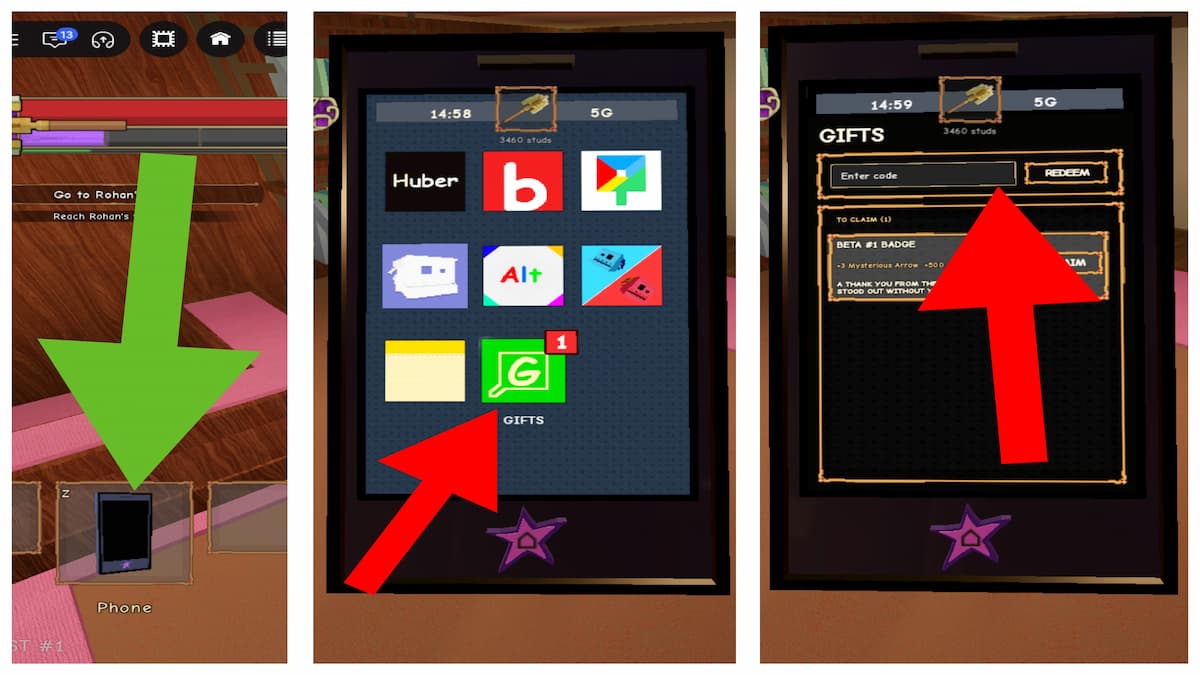
- Join the Studio Umbra: Europa Roblox group.
- Run Stand Out in Roblox.
- Complete the tutorial and receive a phone.
- Open your phone.
- Select the Gifts button.
- Type a code into the textbox.
- Hit Redeem to claim rewards.
Official Wiki, Trello board, and Discord server information for Stand Out
In addition to codes, if you’re looking for an info HUB for the game, check out our Stand Out Trello, Wiki & Discord walkthrough. You’ll find all the necessary links and a brief rundown of everything. The Trello and Wiki are especially useful since they have all the Stands archived in one place with detailed move breakdowns. Of course, there’s a lot more guides and tips on there.
That’s it for now and if you’re looking for more Roblox games and codes for them check out our Roblox codes section. You never know when you’re going to discover your next favorite game.


