Fortnite events and quests often challenge you to interact with gameplay features you likely don’t use very often. It can be quite tough to get these types of missions done, as is the case with one that asks you to favorite a creator.
Even if you spend quite a lot of time exploring maps made by different creators, there’s still a decent chance you haven’t learned how to favorite them yet. Completing this task is essential for certain events, and it also makes finding your favorite maps a lot easier, so here’s how to favorite a creator in Fortnite.
Table of contents
Favorite a creator from their creator page in Fortnite
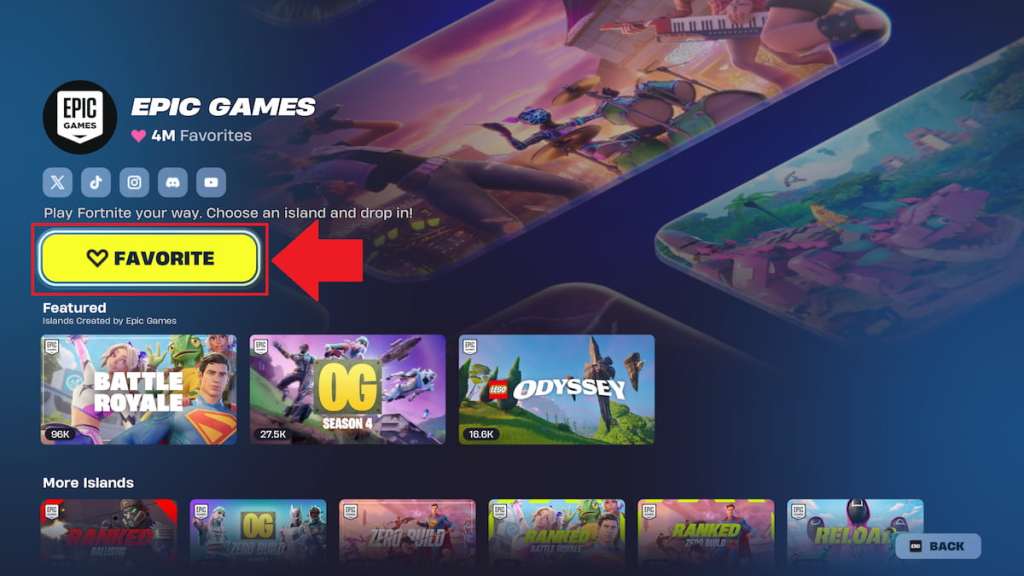
You can favorite a creator by selecting the “Favorite” option on their creator page in Fortnite. If you haven’t done this before, it can be a bit tricky to figure out how to get it done, so here’s a breakdown of all steps you need to follow for this process.
- Locate and select any game experience. This includes those made by Epic Games and those made by members of the community. You can favorite the creator of any game, including Epic Games, so pick whichever one you like. You’ll be favoriting the creator of the map you choose here, so be sure to pick one of your favorites that you play often.
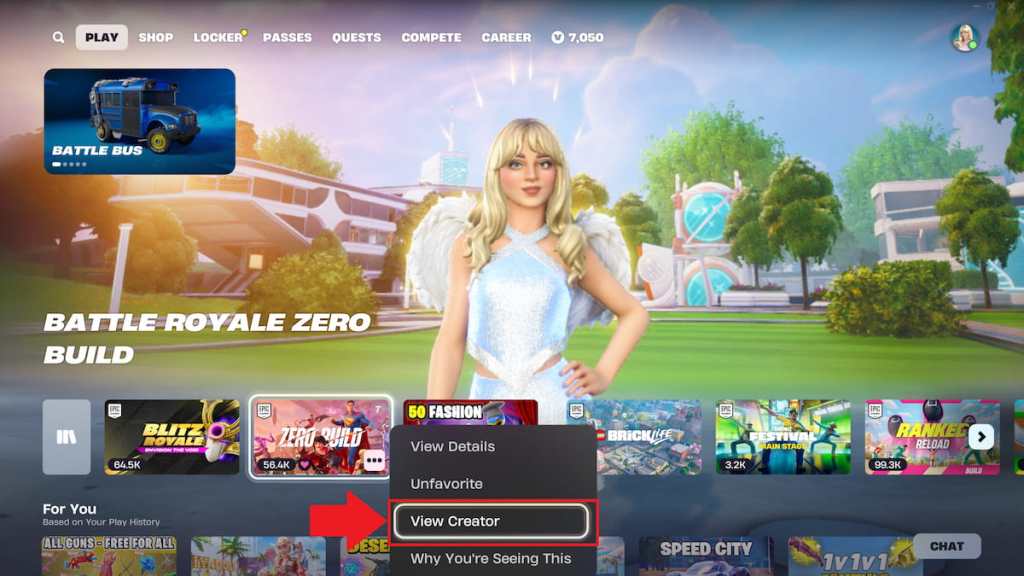
- Click on the three dots in the bottom right corner. Once you select an experience, three dots will pop up near the bottom right corner. You can click them to reveal more options. These dots only show up on the experience you select, so make sure you have one highlighted to get them to appear.
- Select the “View creator” option. It should be the third option down. There’s a “Favorite” option that appears right above it here, but it’s for the map you’ve selected, not the creator who made it, so you have to complete one more step to find the button you’re actually looking for.
- Choose the “Favorite” option. It’s a big, bright yellow button with a heart next to it slightly underneath the name of the creator you selected.
As soon as you select the “Favorite” option, the creator you chose will be added to your favorites. You can repeat this process for as many creators as you like, so feel free to give your other favorites a heart too. If you decide you want to remove a creator from your favorites, simply click the “Favorite” button a second time to do so.
What does favoriting a creator do in Fortnite?
Favoriting a creator makes them easier to find in the future as it adds them to a special “Favorites” tab in your library. From this section, you can click on any creator you’ve given a like to easily view their entire catalogue of games.
Missions asking you to favorite a creator come up occasionally for special events, like in the Summer Road Trip one. If you’re looking to tackle more tricky tasks around the island, consider working on the Trials of Morgan Myst, using Spire Remnants to build a monument to the fallen academy, The Fall of Supernova Academy, and hitting Spires in different matches next.