


One of the biggest limitations of Where Winds Meet concerns the way character creation works.
At first, it appeared that there was no way to create a second character without using a different Steam account or opening a new one. However, there’s an indirect way of getting a new character without having to endure the pain of deleting your old one and waiting for 14 days.
How to get a second character in Where Winds Meet
It’s completely possible to create a new character in Where Winds Meet if you’re playing on PC. The method is slightly complicated since there’s no easy way.
- Make sure you have cleared the tutorial of Where Winds Meet, as you’ll need access to the Settings.
- Go to the Other tab.
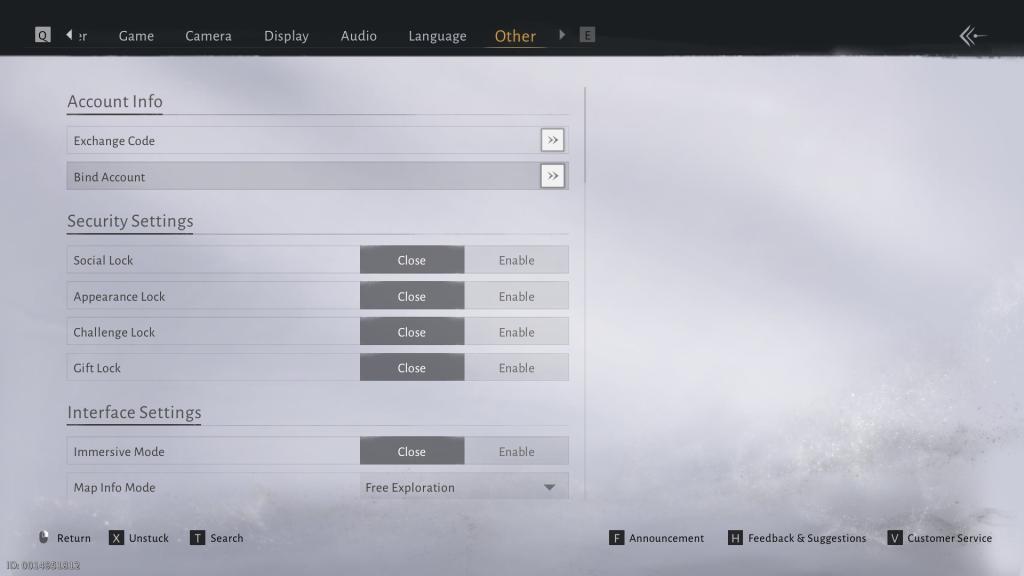
- Select Bind Account (second option from the top). Do note that your account is already bound to Steam. We will now bind it to a NetEase account so that we can create a new character.
- Click on the Link button next to NetEase Games from the following pop-up.
- A browser will take you to NetEase’s website, where you’ll either need to create a new account or log in to your existing one.
- Once done, your account is now bound with NetEase.

- Press V to open Customer Service (located at the bottom-right corner of the screen).
- Choose Unbind from the options.
- Select the Steam account, and type Confirm.
- Restart Where Winds Meet once the process is complete.
When you launch the game again, you can create a new character. We added the NetEase account, as you need to have two accounts before you can unbind. When you start Where Winds Meet, Steam will treat it as a fresh launch.
Hopefully, we will get an easier way to create new characters in the game in a future update.


