


Updated: November 9, 2026
We added a new code!
A zombie outbreak caught you completely unprepared and trapped in your apartment on the 30th floor. Now you have 100 days to survive by scavenging supplies, barricading your home, helping your neighbors, and finding a way to escape before time runs out. In such dire circumstances, 30 Floors Up codes can provide a much-needed helping hand to improve your chances of survival.
All 30 Floors Up codes list
30 Floors Up codes will give you enough Gems and Cash to get better classes and deck out your crib. After all, a stylish interior boosts morale! Visit our 100 Days At Sea codes guide if you’re looking for more high-stakes survival games with deep, intricate mechanics.
Active 30 Floors Up codes
- Update2—Redeem for 30 Gems and 900 Cash (New)

8,000+ Roblox players already have our codes list
Codes Hunter puts our live codes database in your browser. Install today and never miss a Roblox code again.
This is what Codes Hunter shows you.
Codes Hunter does the codes hunting for you.

Stay up-to-date on ALL the latest Roblox news and releases
Join Problox, our free newsletter — the biggest new games, updates, events and codes, in one email.
You’re in — welcome to Problox
Your first issue lands soon. Keep copying codes; we’ll handle the news.
Please enter a valid email address.
Expired 30 Floors Up codes
- There are currently no expired codes.
Related: Survive Your Ideas codes
How to redeem 30 Floors Up codes
Redeem your 30 Floors Up codes by following these exact steps:
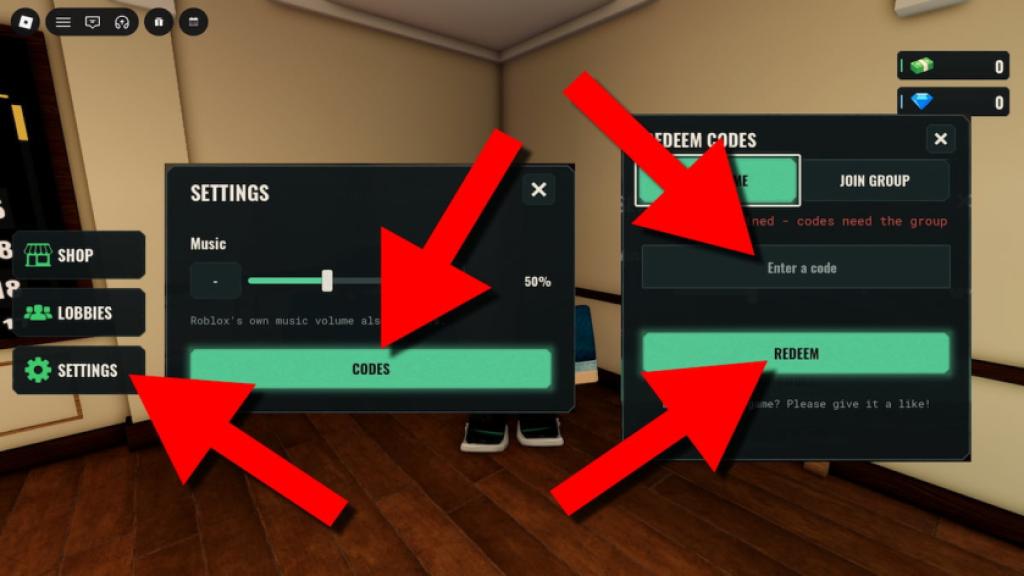
- Like the game and join the Dateline NBC Roblox group.
- Launch 30 Floors Up on Roblox.
- Press the Settings button on the left side of the screen.
- Press the Codes button in the Settings menu,
- Type in a code into the Enter a code text box.
- Press Redeem.
30 Floors Up official Wiki, Trello board, and Discord server information
Join the 30 FLOORS UP Discord server, check the 30 Floors Up Wiki, and jump into the Roblox group linked above for updates, announcements, and game information. There’s no Trello board at the moment, but we’ll add a link to one as soon as it’s up.
Climb toward more rewards in other games by visiting our Roblox codes section on Destructoid.


