


Updated: November 9, 2026
We found new codes!
Night-time driving can be scary. Driving at night in bad weather, even scarier. All that with an unspeakable monster behind your back? At that point, you know you’re in Do Not Stop. The one thing that can help you survive is Cash, and you’ll get some by redeeming Do Not Stop codes.
All Do Not Stop codes list
Redeem the latest Do Not Stop codes to get free Credits that you can spend on useful upgrades and other in-game items. Every bit of extra currency helps when you’re trying to survive what lurks in the dark. If you’re looking for something on two wheels and less scary, try our Throttle codes!
Active Do Not Stop codes
- RELEASE—Redeem for 250 Credits

8,000+ Roblox players already have our codes list
Codes Hunter puts our live codes database in your browser. Install today and never miss a Roblox code again.
This is what Codes Hunter shows you.
Codes Hunter does the codes hunting for you.

Stay up-to-date on ALL the latest Roblox news and releases
Join Problox, our free newsletter — the biggest new games, updates, events and codes, in one email.
You’re in — welcome to Problox
Your first issue lands soon. Keep copying codes; we’ll handle the news.
Please enter a valid email address.
- LASTSTOP—Redeem for 250 Credits
- DONOTSTOP—Redeem for 200 Credits
- ROUTE1610—Redeem for 150 Credits
Expired Do Not Stop codes
- There are currently no expired codes.
Related: Blind but dangerous Codes
How to redeem Do Not Stop codes
Redeeming Do Not Stop codes is easy once you know where to look. Follow the steps below to collect your free Credits:
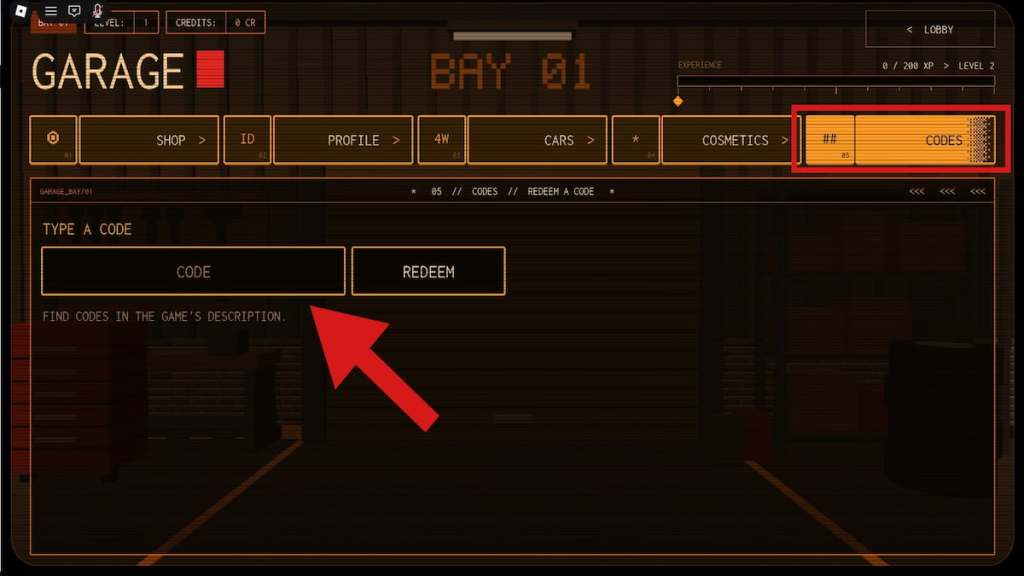
- Launch Do Not Stop on Roblox.
- Start your first ride to unlock all menu features.
- Return to the lobby and open the Garage menu.
- Select the Codes option.
- Enter an active code into the text box.
- Hit Redeem to claim your free Credits.
Do Not Stop official Wiki, Trello board, and Discord server information
Do Not Stop is developed by the make sure to drive fast Roblox group. The game is inspired by analog horror creatures and stories, and its developers share important information through the game’s Roblox description and community channels. You can visit the official Do Not Stop Roblox page for updates and announcements. We haven’t confirmed an official Wiki or Trello board, so check the game’s community links for the latest information about its Discord server.
Scour our Roblox codes section on Destructoid for even more freebies across your favorite games.


