

As a persistently online game, it’s important to know the server status of Wuthering Waves. If the servers are down, it means you can’t play, and if they are undergoing any sort of issues, it can help troubleshoot when you’re having connection problems.
Here is how to view the Wuthering Waves server status so you can know if there is any downtime.
Wuthering Waves server status
Unfortunately, there is no official Wuthering Waves server status page. However, you can often figure out the status of the servers via a variety of resources available online. Here are the best ways to keep up with the Wuthering Waves server status:
- Wuthering Waves Twitter – So far the developers of Wuthering Waves have been very consistent with posting updates regarding the game on their official Twitter, which should include any potential downtime or other server status-related issues.
- Wuthering Waves Subreddit – Though community-operated, a good way to check if there are server issues is to view the WW subreddit and filter by New. If you see a flood of posts from people saying they can’t connect, chances are it’s a server issue.
- Wuthering Waves on Facebook – It seems a bit less active compared to Twitter, but the official Facebook account for Wuthering Waves does appear to be getting status updates as well.
How to monitor server status in Wuthering Waves
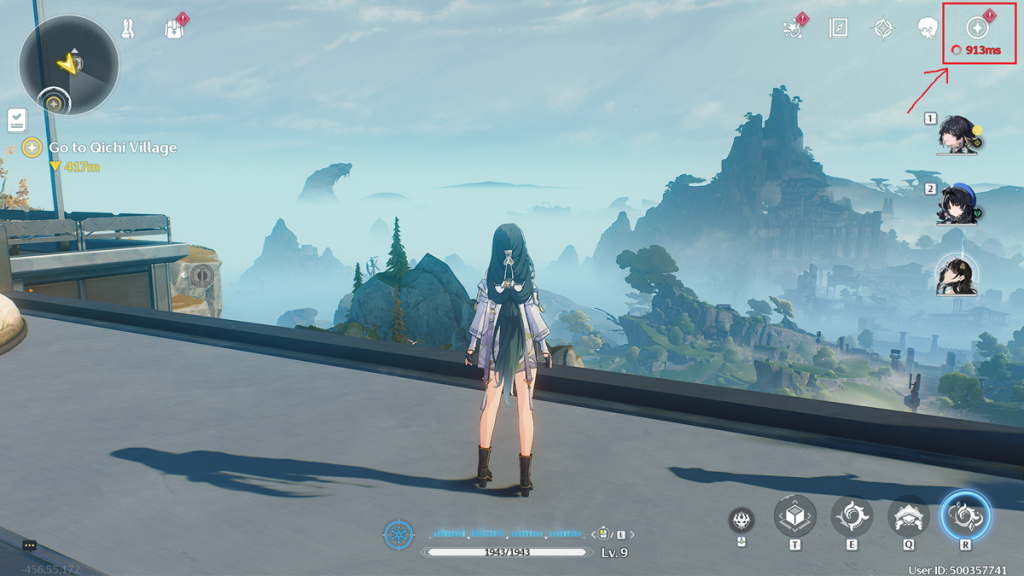
When you’re trying to determine if the Wuthering Waves servers having issues when you’re trying to connect in the first place, you obviously need to do so outside of the game. However, if you’re already in Wuthering Waves and experiencing lag, rubber banding, or latency issues, there’s actually a nifty way to check on the status of your connection to the Wuthering Waves servers.
Anytime while playing if you look at the top right corner you will see your current ping to the Wuthering Waves servers, which is illustrated in three possible colors: Green, Yellow, and Red. Each color represents the quality of your connection to the servers and represents how your gameplay will be affected. This is what each of the ping colors means in Wuthering Waves:
- Green – Great connection. You should not be experiencing any sort of connection-related issues, and the responsiveness of your actions should be instantaneous.
- Yellow – Average connection. You’re connected and able to play without any major issues, but you may experience some delay, rubber banding, or lack of feedback to your actions.
- Red – Poor connection. At this point it’s possible something major on your end like an outage or poor WiFi connection is causing server connection issues. It’s also possible the servers themselves are having issues at this point.
Another interesting note is that if you’re in-game when the servers go offline or have some sort of crash, the ping in the top right will read as >999ms which essentially means the connection was lost.


