


Winning in WARDOGS is much more than just killing your opponents, and that’s where Towers come in. Taking advantage of them allows your team strategic advantage, but not until you know what needs to be done.
In this guide, I will explain how you can make use of these Towers and activate their drill rigs.
How to capture a Tower in WARDOGS
The core objective of a Tower is to help you improve your team’s chances of dominating the Hot Zone. Once the cooldown period is over, head to the Tower to start the process.
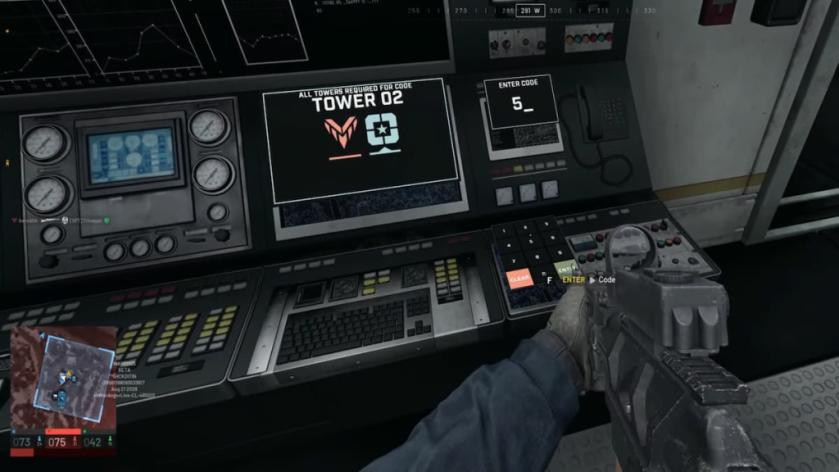
- Head to the second floor and you’ll find the computer.
- Interact with the terminal, and it will begin a capture process. Wait for the process to complete.
- A digit will now appear on the screen. This digit is random (across every run), and your first task is to tell it to your teammates.
- Next, capture all the Towers in the Control Zone.
- Once all of them have been captured, head to the main terminal and enter the code.
- You’ll now activate the Hot Zone Magnet. This forces the Hot Zone to move towards the Tower. It will remain there for a fixed duration before returning to its regular position.
Not only can you find the location of the Towers on the map, but you’ll also find out which faction is in the lead when it comes to controlling them.
The Tower helps you win in two different ways. First, it’s a remarkable vantage point. You can use the shielded zones to target the enemy without the risk of taking much heat.
Secondly, having the Hot Zone under your control raises your team’s cash gain. The more cash your team has, the better loadout they get. Having knowledge of the zone’s location in advance also allows you to create your defense properly.
That said, capturing all the Towers will not be easy. Opposing factions will try to thwart your efforts, so communication is key.


