The Return of the Ancients patch is Path of Exile 2‘s biggest ever expansion, and we can enjoy the Build Planner as a new feature. This feature makes trying out new builds easier than it used to be. You can directly use the specialized builds of creators for your characters in a few simple steps.
Table of contents
How does the Build Planner work in Path of Exile 2
In simple words, you can use the Build Planner to directly copy and import the build made by another person. This could be a content creator or anyone in the community. You can use their build code and import it with the Planner. Then, you’ll be able to proceed with completing the build for your character.
The core process is broken down into two steps: downloading the code and then importing it.
Downloading the build
Once you’ve spotted a build you like, you can download and save it on your device. The stored file will be of “BUILD type,” and you have to open it directly from inside the game. Make sure to remember where you have stored the file, as it will be important for the next step.
Importing the downloaded build
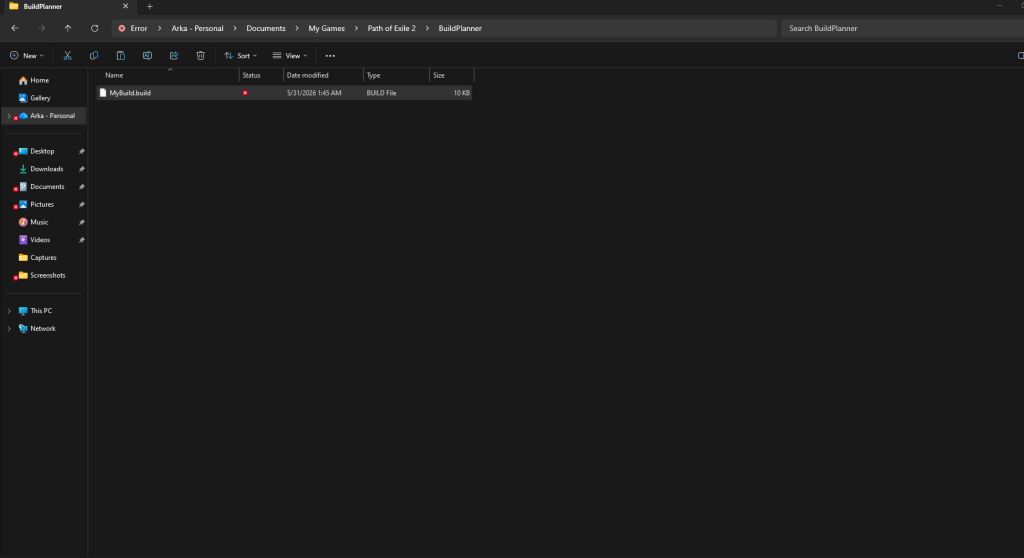
Go to the folder where you downloaded the file. Then, copy and paste it into the Build Planner folder. You will find it in the Path of Exile 2 folder within My Games (under Documents). Paste the file, and it will be ready for import.

Now, load your game and open the Passive Skill Tree page by pressing P. Click on the option on the top-left part of the screen, and you’ll find all available builds from your folder. Select the one that you want to use, and your Passive Skill Tree will look something like the image below.

The blue line is the sequence you need to follow when investing your points. Hence, you no longer need to remember which upgrades are correct; just follow the blue line, and it will do the work for you.
You will also find more guided steps in the Gemcutting section. When you select a build, it will show all the support skills you’ll need to unlock for that build. Similarly, any specific gear requirement will be highlighted in your inventory. Hence, you get a completely guided build framework directly from within the game itself. This also reduces the chances of you making an error along the way while completing your build in the new league.