


Pulse Combos are the training wheels of 2XKO. Just press a button over and over again, and it will let your character execute a flawless combo with a nice finisher for massive damage and instant style. While this feature makes my childhood dream of winning without knowing what I’m doing come true, it’s not always good to leave it on.
Table of contents
How to turn off Pulse Combo
To turn off Pulse Combo in 2XKO and start playing the game without this assist tool, here’s what you have to do.
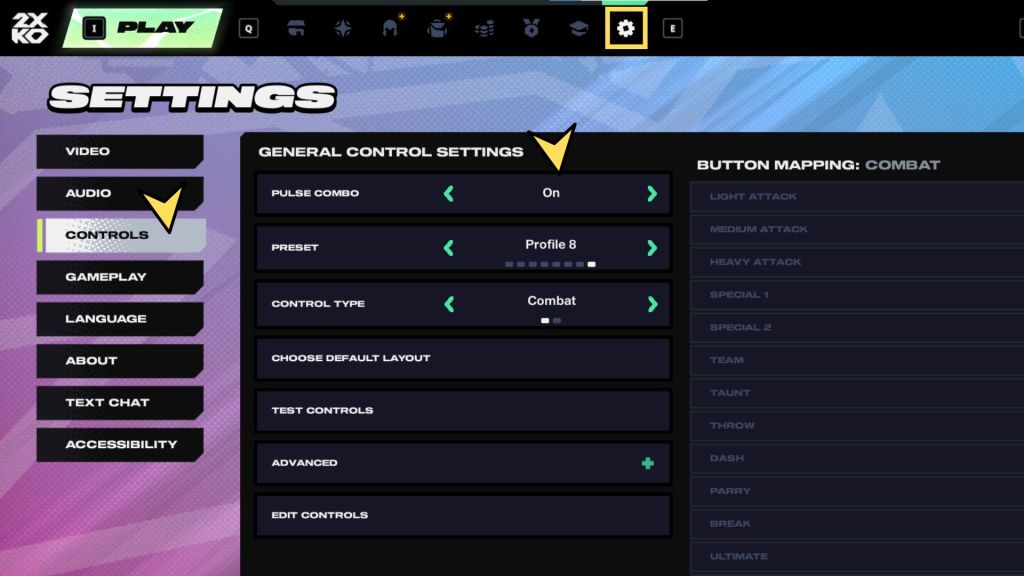
- Go to the lobby
- Navigate to the Settings tab (the gear icon) using the top menu
- On the new screen, select Controls
- Pulse Combo is the first option. Tap left or right to turn it from “On” to “Off”
You don’t have to press any buttons to confirm this new setting. Pulse Combo will now be inactive. Whenever you want, you can revert this by just switching it back to On.
When to turn off Pulse Combo
You should turn off Pulse Combo for better character and Super Meter control. Pulse Combos will usually spend your Super Meter if you use their finishers, which is great if you’re a beginner and land that final hit, but bad if the opponent is blocking. As you learn more about 2XKO, it’s best to have more agency over this resource so you don’t waste it.
Turning off Pulse Combo is also good if you want to learn other complex move sequences that are impossible if it’s turned on. If you find a combo that includes two light attacks in a row, for example, the Pulse Combo will almost always turn the second input into a special, which will break the chain and give you a completely different outcome.
Plus Pulse Combo only lets you use the same combos over and over again, which makes you pretty easy to counter when going against a seasoned pro. If you want to take your game to the next level, turn off Pulse Combo and go into Training to learn each champion’s combos and move to improve as a player.


