Finding time to game as a college student while also managing a full course load and social life can be difficult, so NetEase Games wants to buff its student gamers with some freebies.
Marvel Rivals players can gain access to special perks like unique costumes in the game if they sign up for the College Perks program, using an applicable student email address to wear skins like Spider-Man’s from No Way Home, or Scarlet Witch’s from Doctor Strange in the Multiverse of Madness.
Read on below for all the details on how to obtain your College Perks in Marvel Rivals.
What are College Perks in Marvel Rivals?

College Perks in Marvel Rivals gives bonuses to players who are currently enrolled in a university and have a college email address to prove it. Signing up for College Perks gives you limited time trial access to these skins and their MVP animations (season three):
- Captain America – Avengers: Infinity War
- Cloak & Dagger – Twilight Duo
- Invisible Woman – Malice
- Jeff the Land Shark – Incognito Dolphin
- Moon Knight – Lunar General
- Scarlet Witch – Doctor Strange in the Multiverse of Madness
- Spider-Man – Spider-Man: No Way Home
- The Thing – Trench Coat
- Thor – Lord of Asgard
- Winter Soldier – Blood Soldier
How to unlock College Perks in Marvel Rivals
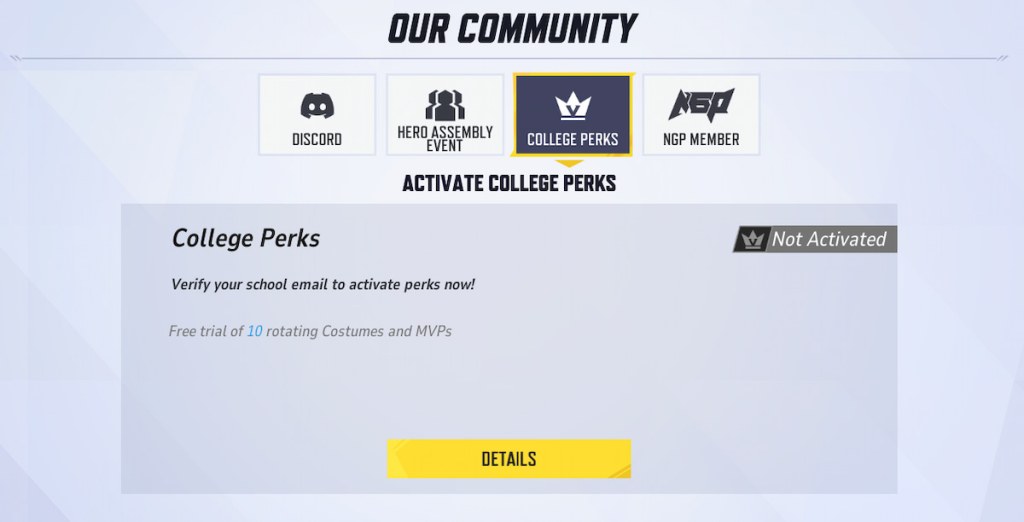
To unlock College Perks in-game, here’s what you need to do.
- Open up Settings by clicking the cog wheel icon in the top right of the main menu screen.
- Select Community.
- Select College Perks.
- Select Details.
- Select Go Verify.
- Enter your student email address.
- Select Get Verification Code.
- Enter the verification code you received in your student email.
- Select Verify.
For this to work, your email must be found on the list of academic email domains supported by the program. For example, any .edu email in the United States will work, but some schools may not be supported yet. However, NetEase says you can request it be added by utilizing in-game support.
You can request that your school be added by accessing Customer Support from the Settings menu, and providing your country/region, full university name, and student email domain.