


Limbus Company is one of those rare gacha games without PvP, but you’ll still have to rely on online connectivity to play.
Project Moon’s gacha adventure requires a persistent online connection despite all the modes being PvE. If you get disconnected at any point in time, you’re likely going to lose your progress on a quest. This makes it crucial for you to be aware of the server maintenance and when it takes place. Having the knowledge will prevent you from having interrupted sessions and losing progress in the process.
How to know about Limbus Company’s server status
Limbus Company has periodic server maintenance that takes place at short notice. The best way to stay aware of it is from within the game. If you’re new and just getting started, checking the official notices is pretty straightforward.
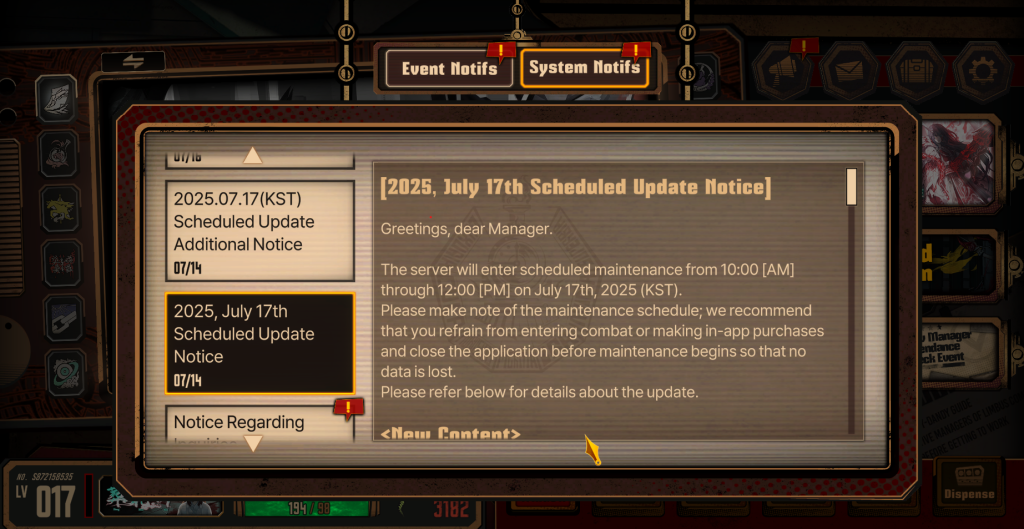
- Open and let the game load after establishing a connection (this process will be incomplete if your network is down or there’s server maintenance).
- On the home screen, press the icon that resembles a mic. It’s to the left of the message icon.
- If there’s a new in-game message, the icon will be highlighted.
- Press on the icon, and it will open two different sets of notifications.
- System Notifications include all messages about upcoming server maintenance.
- You’ll find details about all updates, including the downtimes.
- The timings are always displayed in Korean Standard time, so you’ll need to calculate the applicable numbers for your local time zone.
This is the easiest way to keep track of all upcoming and ongoing maintenance, as the servers are always going to be taken down. An additional source of such information is the subreddit. It’s the largest English-speaking community of the game, and it’s also a good place to stay aware of when the servers are down.
You can also use a third-party website like Downdetector to find out if the servers are down. If all the methods mentioned here have no instances of server downtime, but you can’t connect, chances are that the problems are at your end.


