Money is a key component in Transport Fever 3 if you want to expand your empire, and there’s an external option to change the default currency of the game. While this can’t be done from directly inside the game, the method isn’t too complex, and you won’t need any external app.
Let’s find out how the method works.
How to modify the in-game currency in Transport Fever 3
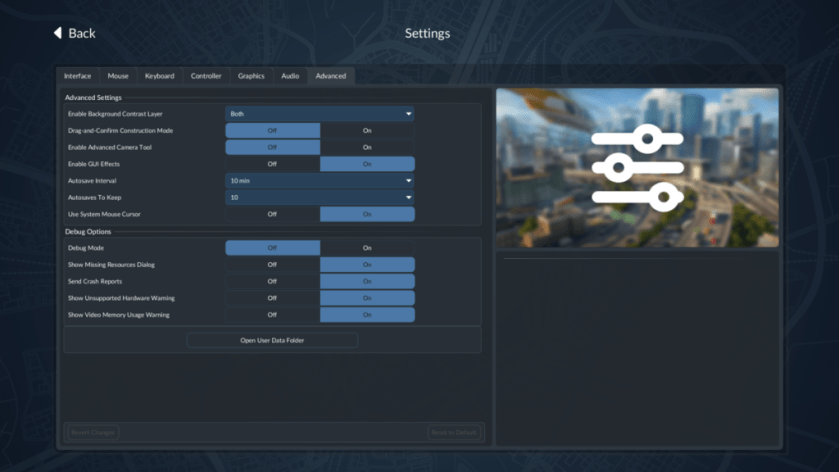
The first task is to load the game and open the Settings. Head to the Advanced Tab and form there, we have to select the “Open User Data Folder”. This will open the location where the game files are installed.
Before proceeding with the changes, it’s best to create a backup of all the files if something goes wrong. However, you can also run a “Verify Integrity of Files” check to download any file that might get corrupt in the process.
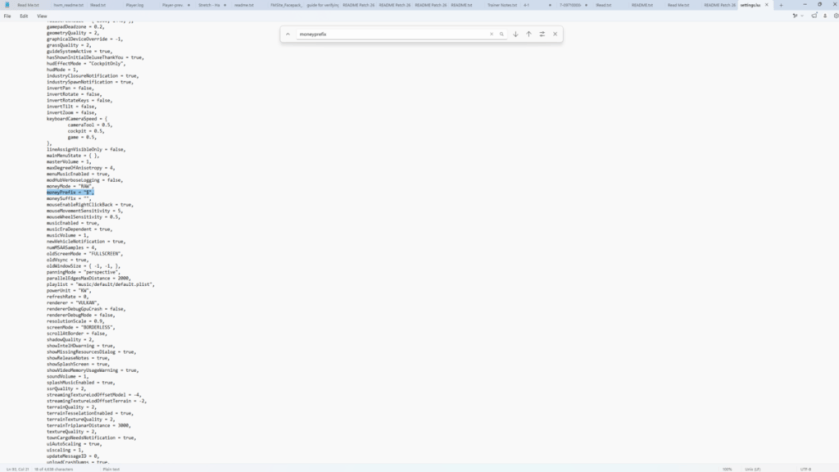
- Look for the Settings.lua file and open it with Notepad.
- Look for the line containing moneyPrefix. You can use Ctrl+F and search for it by entering the text.
- You’ll observe that the default is the $ symbol. However, you can have three other options.
- € = Alt + 0128
- £ = Alt + 0163
- ¥ = Alt + 0165
Save the changes you made, and you’ll get the alternative currencies in the game. Do note that changing the currency doesn’t have any in-game effect. It’s a purely cosmetic change, and has no direct effect on profit, pricing, and other aspects of the game.
Earning money is important since you will need to expand your business and get new vehicles. You can check this guide to find a list of every transport available in the game.