


Updated: November 26, 2026
We added a new code!
In Aero, movement and agility matter more than weaponry. You need to master sprinting, sliding, and wall-running to navigate the map and outmaneuver your enemies. Still, just because firepower comes second doesn’t mean you shouldn’t deck out your guns with some cool skins! Grab some Aero codes and clear the store aisles to show everyone you mean business.
All Aero codes list
If you need extra Credits, Aero codes have you covered. Once you’ve saved up enough spending currency, buy cool skins, charms, and poses that look great in killshot replays and add salt to the enemies’ wounds. Visit our Inkhead codes guide as well to try another game by the same developer!
Active Aero codes
- LAUNCH—Redeem for 1k Credits (New)
This is what Codes Hunter shows you.
Codes Hunter does the codes hunting for you.


Stay up-to-date on ALL the latest Roblox news and releases
Join Problox, our free newsletter — the biggest new games, updates, events and codes, in one email.
You’re in — welcome to Problox
Your first issue lands soon. Keep copying codes; we’ll handle the news.
Please enter a valid email address.
Expired Aero codes
- There are currently no expired codes.
Related: Voxel Wars codes
How to redeem Aero codes
Redeem Aero codes in no time by following the steps below:
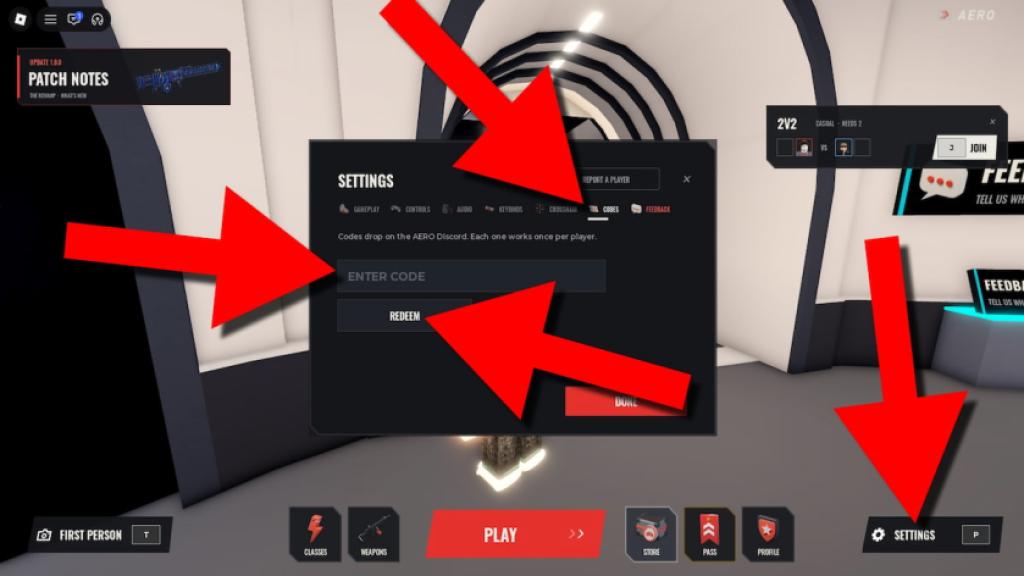
- Launch Aero on Roblox.
- Press P or click the Settings button in the bottom-right corner.
- Click the Codes tab in the Settings window.
- Type in your code into the Enter Code text box.
- Click Redeem to collect your rewards.
Aero official Wiki, Trello board, and Discord server information
Join the Nocturnal Studio Discord server and the Noctornal Studio Roblox group to follow the latest information on the game. Since there’s no Wiki page or Trello board, these two channels will be your main sources for update announcements, giveaways, and new Aero codes.
Grab more freebies for your favorite games by browsing our extensive collection of Roblox codes on Destructoid.


