


There was a time when you could ask Google about a topic and it would simply use its excellent code to leave no web stone unturned in the quest of finding the best possible intel to answer your questions.
Nowadays, however, it’s not unlikely that Google will recommend you drink a probably unreasonable amount of urine — yes, really.
Hey, at least it’s not telling you to produce a lethal type of gas through a process that, guess what, will kill you.
Google is too trusting of AI in general, and way too trusting of their own crappy AI, specifically. Today’s Google wants users to visualize an AI text box that might show April Fools’ worthy results all year long even before they see the actual search results. Luckily, this doesn’t have to be your reality.
Google Chrome now features a “Web Search” option, which pretty much just does away with the AI crap and displays ad-free text search results like it should.
As noted by Tom’s Hardware and PC Gamer, here’s what you can do to remove the AI clutter:
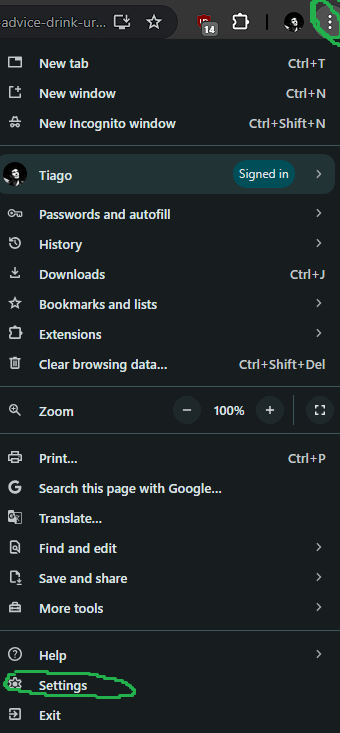
Enter Chrome Settings by clicking on the three dots in the upper right corner of the screen, then on the Settings button:
Click on the Search Engine tab that will show up on the left side of the screen and then on Manage search engines and site search. Scroll down to Site Search:

Click Add to create a new setting:
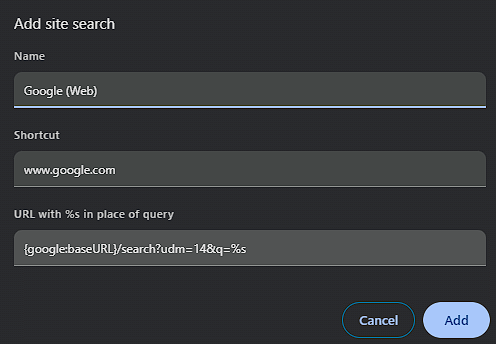
Name: Google (Web)
Shortcut: www.google.com
URL: {google:baseURL}/search?udm=14&q=%s
Click on the three dots to the right of the new entry and pick Make Default:
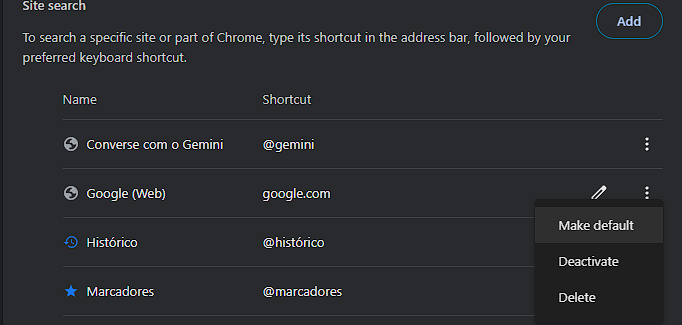
And that’s all you need. If you’ve gone through those steps correctly, Google Chrome should now be back to normal.

Here’s hoping that this guide will dramatically improve your user experience and even your life expectancy while browsing Nu Google Chrome.


